
Your website builder choice determines SEO success before you write a single word of content. Choose wrong, and you fight technical limitations forever. Choose right, and you build on solid foundation enabling organic growth.
According to January 2026 research, 63% of small businesses using drag-and-drop builders report SEO challenges they cannot fix without switching platforms. These aren’t minor inconveniences—they’re fundamental architectural problems preventing pages from ranking regardless of content quality.
The website builder market in 2026 is more competitive than ever. WordPress powers 43% of all websites, while Wix, Squarespace, Shopify, and newer platforms battle for market share. Each claims to be “SEO-friendly,” yet their actual capabilities differ dramatically.
This comprehensive guide evaluates the best website builders for SEO in 2026 based on technical capabilities, real-world performance data, and expert testing. You will understand what makes a platform truly SEO-friendly, see detailed comparisons of leading builders, learn which wins for different use cases, and avoid costly mistakes.
Whether you’re launching a new site or considering migration, this guide provides clarity for choosing the platform that enables—not limits—organic growth.
What Makes a Website Builder “SEO-Friendly”?
Before comparing specific platforms, understand the essential SEO capabilities:
Technical SEO Fundamentals
Page Speed: Fast loading is ranking factor. Builder must generate clean, optimized code and support performance optimization.
Mobile Responsiveness: Google uses mobile-first indexing. Builder must create perfectly responsive sites automatically.
Clean URL Structure: SEO-friendly URLs (example.com/service-name) instead of messy parameters (example.com/page?id=123).
XML Sitemap Generation: Automatic sitemap creation and submission to Google Search Console.
Robots.txt Control: Ability to guide search engine crawling behavior.
SSL/HTTPS: Built-in security certificates (all modern builders provide this).
On-Page SEO Controls
Title Tag Customization: Full control over page titles for every page.
Meta Description Control: Ability to write unique meta descriptions per page.
Header Tag Hierarchy: Proper H1, H2, H3 structure in content editor.
Image Alt Text: Easy addition of descriptive alt text to all images.
Schema Markup: Structured data implementation for rich results.
Canonical URLs: Prevention of duplicate content issues.
Content Management
Blogging Capabilities: Robust blog platform with categories, tags, archives.
Content Flexibility: Freedom to create any content structure needed.
Internal Linking: Easy linking between pages with descriptive anchor text.
URL Editing: Ability to customize slugs for every page and post.
Performance and Technical
Core Web Vitals: Platform must enable passing Google’s performance standards.
Code Quality: Clean HTML, CSS, JavaScript without bloat.
Server Response Time: Fast hosting infrastructure.
CDN Integration: Content delivery network support for global speed.
Caching: Built-in or easy caching implementation.
Advanced Capabilities
Custom Code Access: Ability to add custom HTML, CSS, JavaScript when needed.
API Access: Integration with third-party tools and services.
Migration Options: Ability to export content if you switch platforms.
Scalability: Platform grows with your business needs.
Understanding entity-based SEO helps contextualize technical requirements.
The 2026 Website Builder Landscape
Current market overview:
Market Leaders:
- WordPress (43% market share)
- Wix (2.6% but growing)
- Squarespace (1.7%)
- Shopify (e-commerce focus)
- Webflow (developer-friendly)
Key Trend: Shift toward AI-assisted building while maintaining SEO control. Platforms now offer AI content generation, design suggestions, and automated optimization—but manual control remains essential.
The Reality: No platform is perfect for every use case. Best choice depends on your technical skill, business type, budget, and specific SEO priorities.
Platform-by-Platform SEO Analysis
Detailed evaluation of leading builders:
WordPress (Self-Hosted)
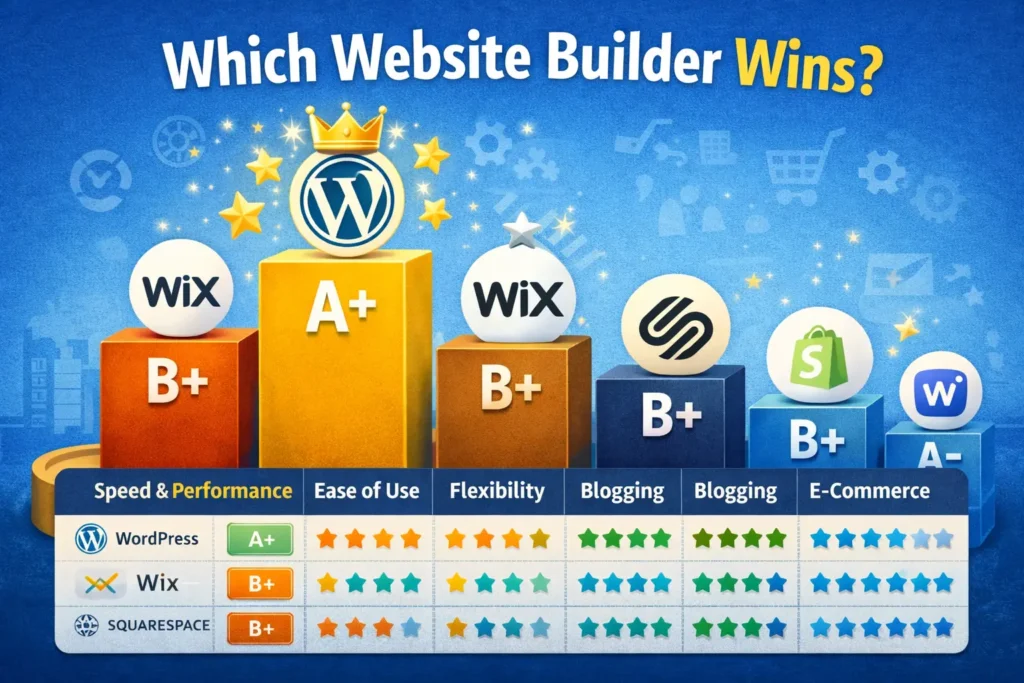
Overall SEO Grade: A+
Strengths:
- Complete control over every SEO element
- Unlimited customization via plugins
- Best-in-class blogging capabilities
- Clean, semantic code
- Excellent performance when configured properly
- Schema markup via plugins
- Advanced technical SEO options
- No platform limitations
SEO Challenges:
- Requires technical knowledge or developer
- Performance depends on hosting, theme, and plugins
- More maintenance required
- Can become bloated with too many plugins
- Security responsibility falls on you
Best For:
- Businesses prioritizing maximum SEO control
- Content-heavy sites with robust blogging
- Companies with technical resources
- Sites requiring custom functionality
- Long-term scalability needs
Popular SEO Plugins:
- Yoast SEO or Rank Math (on-page optimization)
- WP Rocket (caching and speed)
- Smush (image optimization)
- Schema Pro (structured data)
Performance Potential: With proper hosting and optimization, WordPress sites achieve excellent Core Web Vitals scores and fast loading times.
2026 Insight: WordPress remains the gold standard for SEO-serious websites. The flexibility to optimize anything gives it unmatched potential—but requires expertise to unlock.
Learn about Some SEO Strategies for Startups for WordPress best practices.
Wix
Overall SEO Grade: B+
Strengths:
- Dramatically improved SEO capabilities since 2020
- Automatic mobile optimization
- Built-in SEO wizard for guidance
- Clean URL structure
- Fast Wix infrastructure
- Good Core Web Vitals scores
- SSL included
- Easy-to-use interface
SEO Challenges:
- Less flexibility than WordPress
- Limited ability to add custom code
- Structured data options more restricted
- Cannot switch templates without rebuilding site
- Some advanced technical SEO harder to implement
Best For:
- Small businesses wanting ease of use with solid SEO
- Users without technical expertise
- Service-based businesses
- Portfolio and showcase sites
- Quick launch priorities
Built-in SEO Features:
- SEO Wiz setup tool
- Automatic meta tag fields
- Mobile optimization
- XML sitemap generation
- Robots.txt access
- Google Search Console integration
2026 Performance: Wix sites now compete reasonably well in search results for low-to-medium competition keywords. Limitations appear primarily for highly competitive industries or advanced technical requirements.
The Verdict: Wix has evolved from “not SEO-friendly” to “quite capable” for most small business needs. Still behind WordPress for maximum control, but vastly better than reputation suggests.
Squarespace
Overall SEO Grade: B+
Strengths:
- Beautiful, clean code
- Excellent mobile responsiveness
- Good page speed out of the box
- Simple SEO settings that work well
- Strong for visual businesses
- SSL included
- Reliable hosting infrastructure
- Integrated analytics
SEO Challenges:
- Limited customization compared to WordPress
- Blogging features less robust
- Restricted ability to add custom functionality
- Template switching requires manual migration
- Advanced technical SEO options limited
Best For:
- Creative professionals and portfolios
- Small businesses prioritizing design
- Photography and visual showcase sites
- Restaurants and hospitality
- Users valuing simplicity over maximum control
Built-in SEO Features:
- Clean URL structure
- Page-specific meta tags
- Automatic mobile optimization
- XML sitemap generation
- SSL certificates
- Built-in image optimization
- AMP support
2026 Status: Squarespace remains strong choice for visually-focused businesses where design quality matters as much as SEO. Technical SEO capabilities are solid for most use cases.
The Trade-off: You sacrifice some SEO flexibility for superior design templates and ease of use. For many businesses, this trade-off makes sense.
Shopify
Overall SEO Grade: B+ (E-commerce Specific)
Strengths:
- Strong for e-commerce SEO specifically
- Fast loading speeds
- Excellent mobile optimization
- Built-in structured data for products
- Good URL structure for products/collections
- Solid blogging capabilities
- SSL included
- Reliable global CDN
SEO Challenges:
- URLs include /products/ and /collections/ (cannot remove)
- Blog URLs include /blogs/ (cannot remove)
- Limited control over URL structure
- Duplicate content issues with product variants
- Advanced technical SEO requires apps
- Less flexible than WordPress for content sites
Best For:
- E-commerce stores of any size
- Product-focused businesses
- Dropshipping operations
- Brands selling physical products
- Companies prioritizing sales over content
E-commerce SEO Strengths:
- Product schema markup built-in
- Fast checkout performance
- Inventory management integrated
- Multi-channel selling support
- Payment processing optimization
2026 Reality: For e-commerce, Shopify offers excellent balance of SEO capability, ease of use, and sales features. URL structure limitations matter less than its e-commerce advantages.
Content Marketing Note: Shopify’s blog is functional but limited. Serious content marketing may require supplementing with separate WordPress blog.
Webflow
Overall SEO Grade: A-
Strengths:
- Clean, semantic code
- Complete control over HTML/CSS
- Excellent performance potential
- Full customization without plugins
- Designer-friendly visual interface
- Built-in CMS capabilities
- Fast Webflow hosting
- Good for complex layouts
SEO Challenges:
- Steeper learning curve
- More expensive than some alternatives
- Requires understanding of web design principles
- Limited third-party integrations compared to WordPress
- Smaller community and resources
Best For:
- Designers and agencies
- Businesses wanting custom designs with SEO control
- Companies with design-savvy teams
- Brands prioritizing unique layouts
- Projects requiring pixel-perfect execution
Technical Excellence: Webflow generates exceptionally clean code, enabling excellent technical SEO. Sites load fast and follow best practices automatically.
2026 Position: Webflow bridges gap between WordPress flexibility and drag-and-drop simplicity. It requires more learning but rewards with professional results.
Other Notable Platforms
Weebly (Grade: B-): Simple and affordable but limited for serious SEO. Best for very small businesses with minimal SEO ambitions.
GoDaddy Website Builder (Grade: C+): Easy to use but significantly limited SEO capabilities. Not recommended for SEO-focused businesses.
BigCommerce (Grade: B+): Excellent for large e-commerce sites. Similar SEO capabilities to Shopify with different strengths.
Ghost (Grade: A-): Excellent for content publishers and bloggers. Fast, clean, SEO-capable. Less flexible than WordPress but focused on publishing.
Learn about content marketing strategy across different platforms.
Head-to-Head Comparison
Direct comparison of top platforms:
Speed and Performance
Winner: Webflow
- Clean code, fast hosting
- Runner-up: Squarespace (good baseline performance)
- WordPress varies by setup
- Wix and Shopify solid but dependent on design choices
Ease of Use
Winner: Wix
- Most intuitive for beginners
- Runner-up: Squarespace (simple but elegant)
- Shopify easy for e-commerce specifically
- WordPress steeper learning curve
- Webflow requires design knowledge
Flexibility and Control
Winner: WordPress
- Unlimited customization
- Runner-up: Webflow (high control, cleaner than WordPress)
- Wix, Squarespace, Shopify all more limited
- Trade-off between ease and control
Blogging Capabilities
Winner: WordPress
- Built for blogging originally
- Runner-up: Ghost (if pure publishing focus)
- Squarespace and Wix adequate
- Shopify functional but limited
- Webflow good but less feature-rich than WordPress
E-commerce SEO
Winner: Shopify
- Purpose-built for online stores
- Runner-up: BigCommerce (more flexibility)
- WordPress with WooCommerce very capable but complex
- Squarespace and Wix adequate for small stores
- Webflow requires more custom work
Schema and Structured Data
Winner: WordPress (with plugins)
- Most comprehensive options
- Runner-up: Shopify (excellent product schema)
- Webflow allows custom implementation
- Wix and Squarespace more limited
Price for SEO Value
Winner: WordPress
- Free software, pay for hosting ($5-50/month typically)
- Runner-up: Wix (good value at mid-tier plans)
- Squarespace premium but fairly priced
- Shopify justified for e-commerce
- Webflow higher cost but professional results
Which Website Builder Wins? (By Use Case)
The best platform depends on your specific situation:
For Maximum SEO Control: WordPress
Choose WordPress when:
- SEO is top priority
- You have technical resources
- You need unlimited customization
- Content marketing is core strategy
- You’re building for long-term
- Scaling to large site is possible
Hosting Recommendations: Quality hosting is crucial for WordPress. Consider managed WordPress hosts like WP Engine, Kinsta, or Flywheel for better performance.
For Ease + Solid SEO: Wix
Choose Wix when:
- You want drag-and-drop simplicity
- Technical expertise is limited
- Quick launch is important
- Small business with moderate competition
- Design flexibility matters
- All-in-one solution appeals
For Design + SEO Balance: Squarespace
Choose Squarespace when:
- Visual appeal is crucial
- You’re in creative industry
- Simplicity and elegance matter
- SEO needs are moderate
- You value cohesive ecosystem
- Template quality is priority
For E-commerce: Shopify
Choose Shopify when:
- Selling physical products online
- E-commerce is primary function
- Easy inventory management needed
- Scaling sales is goal
- Payment processing matters
- Multi-channel selling desired
For Custom Design + Control: Webflow
Choose Webflow when:
- You have design skills
- Custom layouts required
- Code quality is priority
- Clean, fast sites essential
- Willing to learn platform
- Budget supports premium tool
Migration Considerations
Switching platforms is possible but has costs:
Easiest to Migrate From:
- WordPress (excellent export options)
- Squarespace (reasonable export tools)
Hardest to Migrate From:
- Wix (limited export capabilities)
- Proprietary builders (often lose significant functionality)
Migration Best Practices:
- Export all content before starting
- Plan redirect strategy for every URL
- Maintain same URL structure if possible
- Test thoroughly before switching DNS
- Monitor rankings closely after launch
- Budget adequate time and resources
The Warning: Difficulty of migration is reason to choose carefully initially. Switching platforms mid-journey is expensive and risky.
Common Mistakes When Choosing Builder
Avoid these errors:
Mistake 1: Prioritizing Price Over SEO Capability
Cheap builder that limits SEO costs far more in lost traffic than price difference between platforms.
Mistake 2: Ignoring Long-Term Needs
Choose based on where business is going, not just where it is now.
Mistake 3: Underestimating Technical Requirements
“Easy to use” matters less than “capable of ranking” for SEO-focused sites.
Mistake 4: Not Testing Performance
Request speed test results or build test site before committing.
Mistake 5: Trusting Marketing Over Reality
All builders claim to be “SEO-friendly.” Verify actual capabilities independently.
Mistake 6: Forgetting About Content
Best builder won’t rank you without quality content. Platform enables—content delivers.
Mistake 7: Choosing Based on Familiarity Alone
Comfort with platform matters, but don’t let it override better options.
Conclusion: Match Platform to Priorities
No single website builder wins for everyone. The best choice depends on your specific situation, priorities, and resources.
Key Takeaways:
- WordPress offers maximum SEO control and flexibility (best for serious SEO)
- Wix has dramatically improved and offers solid SEO with easy interface
- Squarespace balances beautiful design with good SEO capabilities
- Shopify wins for e-commerce-specific SEO and functionality
- Webflow provides professional results for design-capable users
- Essential SEO features: speed, mobile optimization, meta control, clean URLs, schema
- Platform choice impacts SEO ceiling before any content is created
- Migration between platforms is possible but costly
- Technical SEO matters as much as on-page optimization
- All builders require good content—platform just enables or limits optimization
What To Do Now:
- Define Priorities: SEO control vs. ease of use vs. design vs. features?
- Assess Resources: Technical skills available? Budget constraints?
- Consider Timeline: Immediate launch or longer development acceptable?
- Test Platforms: Most offer free trials—build test pages and evaluate
- Choose Strategically: Pick platform supporting long-term goals
The Bottom Line:
For maximum organic growth potential, WordPress remains king—if you have resources to leverage it properly. For small businesses prioritizing simplicity with respectable SEO, Wix or Squarespace deliver well. For e-commerce, Shopify’s specialized features outweigh URL structure limitations.
Choose based on your reality, not ideal scenarios. The platform you’ll actually optimize beats the “best” platform you’ll neglect.
For comprehensive SEO guidance, read our guides on SEO mistakes to avoid and how AI affects helpful content.
Build on the right foundation. Your organic growth depends on it.